GraphQL API
The Nostalgia API is a GraphQL server providing access to game releases, ROMs, systems, reviews, and media across the entire Nostalgia Lab database.
For step-by-step instructions on authentication and obtaining your API keys, see the Authentication Guide.
For the complete API schema types, fields, and queries, see the GraphQL Schema Reference.
For copy-pasteable client SDK integrations (cURL, JavaScript, Python) and 23 query recipes, see GraphQL Examples & Recipes.
5-Minute Setup
- Log in at search.nostalgialab.org or api.nostalgialab.org (Google, Microsoft, or Discord)
- Click the Key icon in the top bar and click "Generate Key"
- Copy your key -- it is shown only once (format:
nlk_+ 48 characters) - Make your first query:
API Key Required
All GraphQL queries require an API key. Unauthenticated requests return 403 Forbidden. See the Authentication Guide to generate your key.
Endpoint
The GraphQL endpoint is the root path (/). Send your queries as POST requests with a JSON body.
Explorer
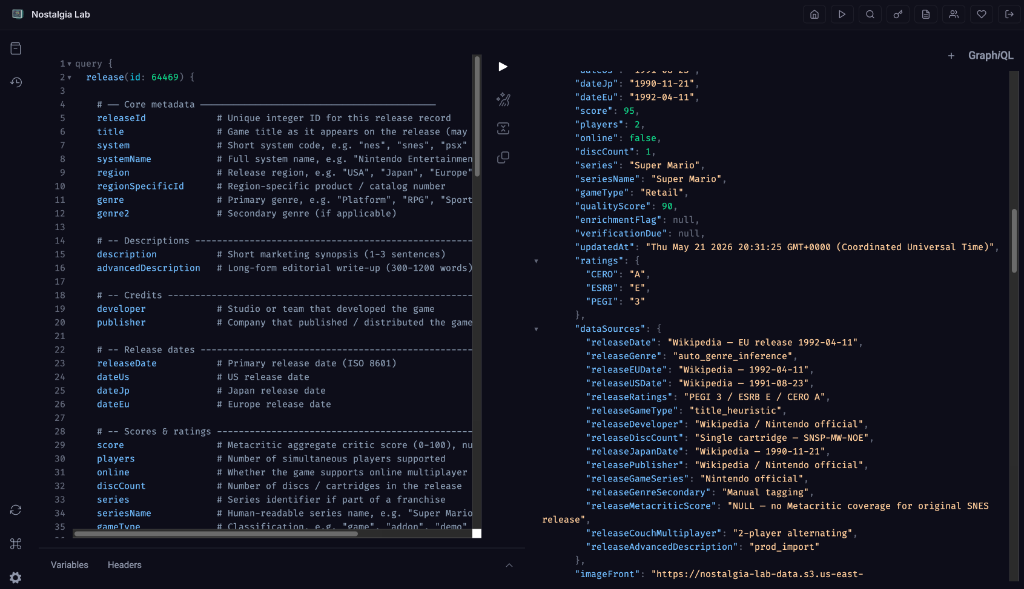
The API includes a built-in GraphQL Explorer for testing queries interactively in your browser.
- Navigate to api.nostalgialab.org
- Log in (the Explorer requires authentication)
- An API key is auto-generated for first-time users
- Write and execute queries directly in the Explorer UI
Configuration
| Setting | Value |
|---|---|
| Max query depth | 6 levels (enforced by graphql-armor) |
| Default limit | 20 results |
| Max limit | 100 results |
| Image URL TTL | 900 seconds (15 minutes) |
| Download URL TTL | 3600 seconds (1 hour) |
Troubleshooting
| Problem | Cause | Solution |
|---|---|---|
| 403 Forbidden | No API key provided, or invalid key | Include Authorization: Bearer nlk_... header. See Authentication. |
| "Cannot query field" error | Incorrect field name in your query | Check the GraphQL Schema Reference. Use the Explorer to test queries interactively. |
| Empty results | System code does not exist, or no matching data | Verify the system short code (e.g., "SNES", not "Super Nintendo"). Try a broader query. |
| CORS errors | Calling API from a browser on a different domain | Use a server-side proxy. The API is designed for server-to-server or CLI usage, not direct browser calls from other domains. |
| Expired image URLs | Presigned URLs are only valid for 15 minutes | Re-query the API to get fresh image URLs. Do not cache presigned URLs long-term. |