Login
Nostalgia Login at login.nostalgialab.org is the centralized Single Sign-On (SSO) service for all Nostalgia Lab platforms. One account works across every service.
Before You Start
- Any modern browser works for login (Firefox, Safari, Chrome, Edge -- all fine).
- Only Play requires a Chromium browser. Login itself works everywhere.
- No password needed. You sign in with an existing Google, Microsoft, or Discord account.
- Your session lasts 24 hours, then you log in again.
Which Services Require Login?
| Service | Login Required? | Details |
|---|---|---|
| Play | Yes | Free login required to access the emulator |
| Search | No | Searching is public. Login is optional. |
| GraphQL API | API key needed | API key generated after login (see Getting an API Key) |
| SQLite Downloads | Yes | Login required to generate presigned download URLs |
| Explorer | Yes | Login required to use the GraphQL Explorer at api.nostalgialab.org |
Creating Your Account
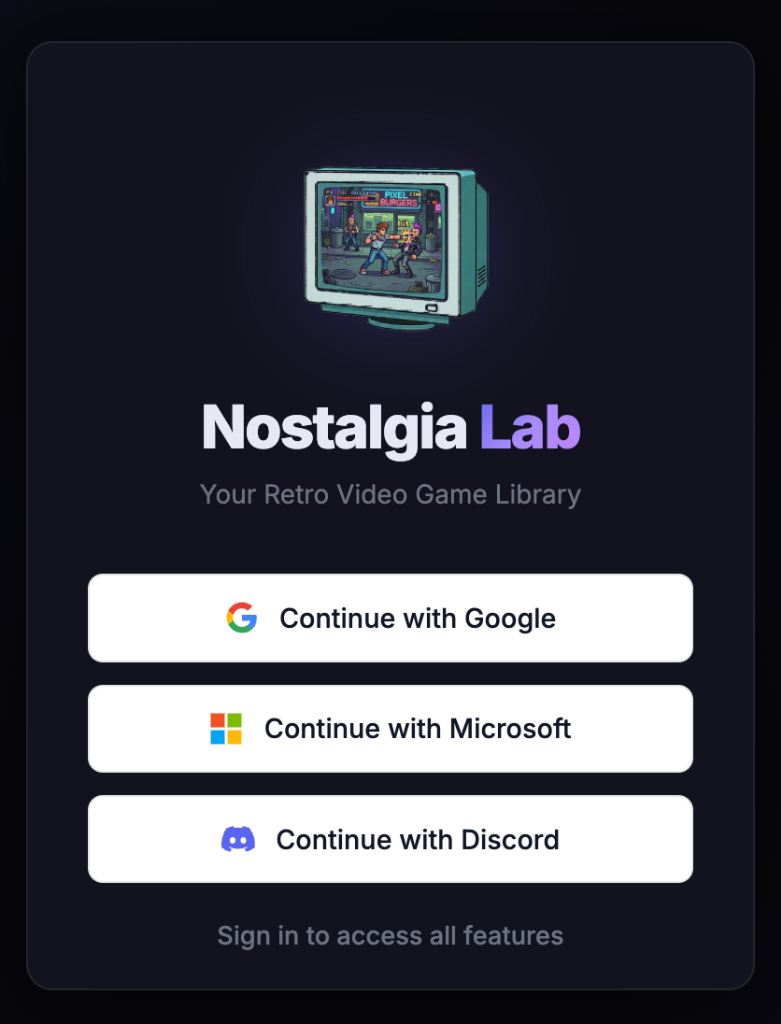
- Navigate to any Nostalgia service (e.g., play.nostalgialab.org)
- You are redirected to
login.nostalgialab.org - Click your OAuth provider button:
- "Continue with Google" -- uses your Google account
- "Continue with Microsoft" -- uses your Microsoft / Outlook account
- "Continue with Discord" -- uses your Discord account (email must be verified)
- Authorize Nostalgia Lab on the provider's consent screen (only email and basic profile info are requested)
- Done: you are redirected back to the service, logged in. A session cookie is set automatically.
Tip
You only need to create your account once. The same login works across play.nostalgialab.org, search.nostalgialab.org, api.nostalgialab.org, and nostalgialab.org.
Guest Access
Some features are available without logging in:
| Feature | Available as Guest? |
|---|---|
| Search the game database | Yes |
| Browse game detail pages | Yes |
| Play | No -- login required |
| SQLite Downloads | No -- login required |
| GraphQL API | No -- API key required (free after login) |
Signing Out
To sign out of any Nostalgia service:
- Click the Logout button in the top navigation bar (it looks like a door or exit icon)
- You are immediately signed out and redirected to the home page
- Your session is revoked server-side instantly -- it cannot be used again
Note
Logging out from any Nostalgia service signs you out of all services at once. Your session is revoked across Play, Search, NostalgiaDB, and the API Explorer.
Account Data
What We Store
| Data | Source | Purpose |
|---|---|---|
| Email address | OAuth provider | Unique account identifier |
| Display name | OAuth provider | Shown in the UI |
| Profile picture | OAuth provider | Shown in the UI |
| OAuth provider name | Login flow | Identifies which provider you used |
What We Do NOT Store
- Passwords (we never see your password, only OAuth tokens)
- OAuth access tokens (used once to fetch your profile, then discarded)
- Browser history or activity logs
- Any data from your Google, Microsoft, or Discord account beyond email and profile
Troubleshooting
| Problem | Cause | Solution |
|---|---|---|
| Infinite redirect loop | Third-party cookies blocked for .nostalgialab.org | Enable cookies for .nostalgialab.org in your browser settings. Clear all Nostalgia cookies and try again. |
| Session expired unexpectedly | JWT tokens are valid for 24 hours | Log in again. Sessions cannot be extended. |
| Login popup closes without completing | Browser blocking popups or JavaScript error | Allow popups for login.nostalgialab.org. Disable ad blockers temporarily. |
| "Email not allowed" error | Server has ALLOWED_EMAILS or ALLOWED_DOMAINS restrictions | Contact the administrator. The public instance at nostalgialab.org has no email restrictions. |
| Login works but Play says "not supported" | Using Firefox or Safari | Login works on all browsers, but Play requires a Chromium browser (Chrome, Edge, Brave). |
| Logged out of one service but still in another | Cookie clearing timing | Log out from each service individually, or clear cookies for .nostalgialab.org. |
| "State mismatch" error | CSRF state token expired (5 minute window) or back button used | Close all login tabs, clear cookies for nostalgialab.org, and start login from a single tab. |
| Discord login fails: "email required" | Discord account has no verified email | Add and verify an email address in your Discord account settings, then try again. |
Community
| Platform | Link | Purpose |
|---|---|---|
| Discord | discord.gg/Guuukt9zuR | Chat, support, bug reports |
| r/NostalgiaLab | Discussion and news |